A few days ago, a client came to me complaining that none of the high-quality articles they had been publishing over the last 30 days were showing up on Google. They were panicking, thinking they had been hit with a shadow ban or a heavy algorithmic penalty.
When I audited their site backend, the problem wasn’t their content at all. It was a single line of text in their root directory. A poorly configured automated SEO plugin had generated a broken layout rule that accidentally told Googlebot to stop crawling their entire post folder.
Your robots.txt file is the literal gatekeeper of your website. If it is misconfigured, your site will suffer massive indexing delays—or worse, get completely rejected during a manual Google AdSense review because the bots can’t read your pages.
While many people search for a generic free ai robots txt generator online, those automated tools often spit out outdated structures that don’t match your actual website layout. In this guide, I will show you exactly how to create custom robot txt using chatgpt to build a flawless crawl map that maximizes your SEO performance.
Why a Custom Robots.txt File Matters for SEO
Every search engine engine allocates a specific “crawl budget” to your site. This is the maximum amount of time and server resources a bot will spend reading your site pages on a given day.
If you leave your robots.txt default or broken, search engines waste time crawling irrelevant technical files, administrative panels, and internal search result URLs.
By using a targeted wordpress dynamic crawl rules script, you gain three major advantages:
- Saves Crawl Budget: Forces bots to ignore backend files and focus 100% of their energy indexing your money-making articles.
- Protects Private Directories: Prevents search engines from displaying your administrative login pages or internal plugins in public search results.
- Guarantees Proper Sitemaps: Ensures search engine spiders find your master XML sitemap index immediately upon arrival.
The Perfect ChatGPT Prompt for Robots.txt Optimization
To get a highly optimized file, you need to feed ChatGPT the exact structural layout of a standard, fast-loading WordPress installation.
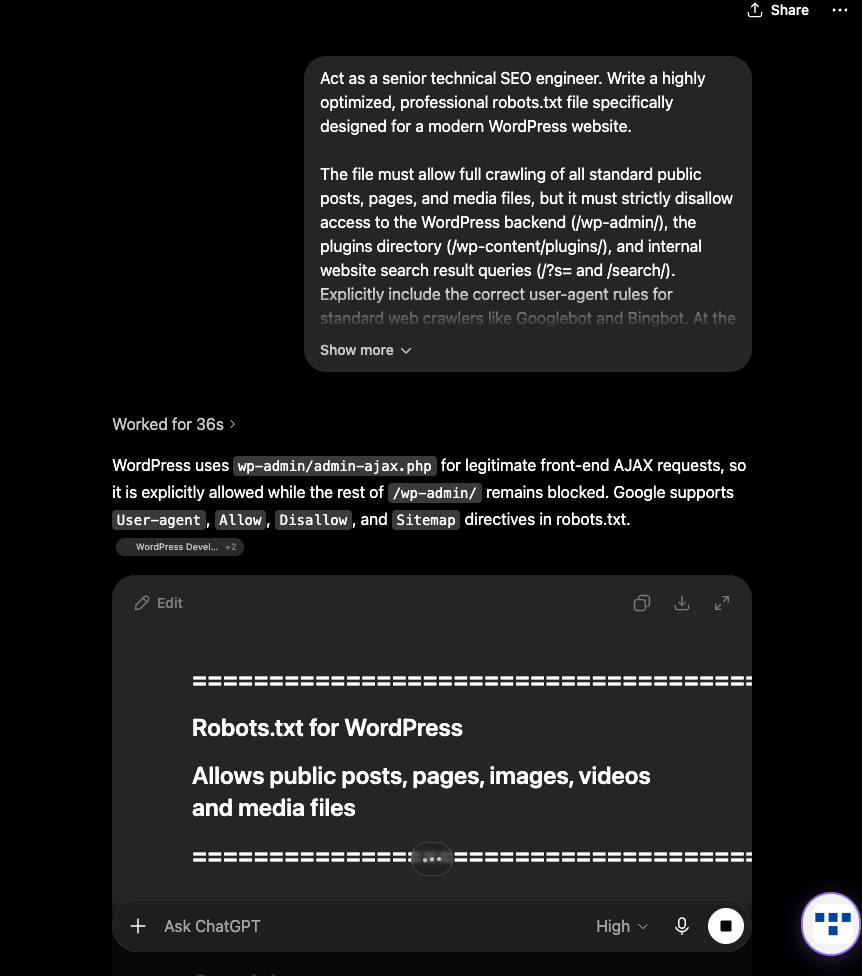
Copy this prompt, replace the bracketed placeholder with your actual sitemap link, and drop it into ChatGPT:
How to Deploy Your Custom File in WordPress
Once ChatGPT gives you your optimized text blocks, you need to add it to your root directory. You have two incredibly easy ways to do this without touching your host’s cPanel:
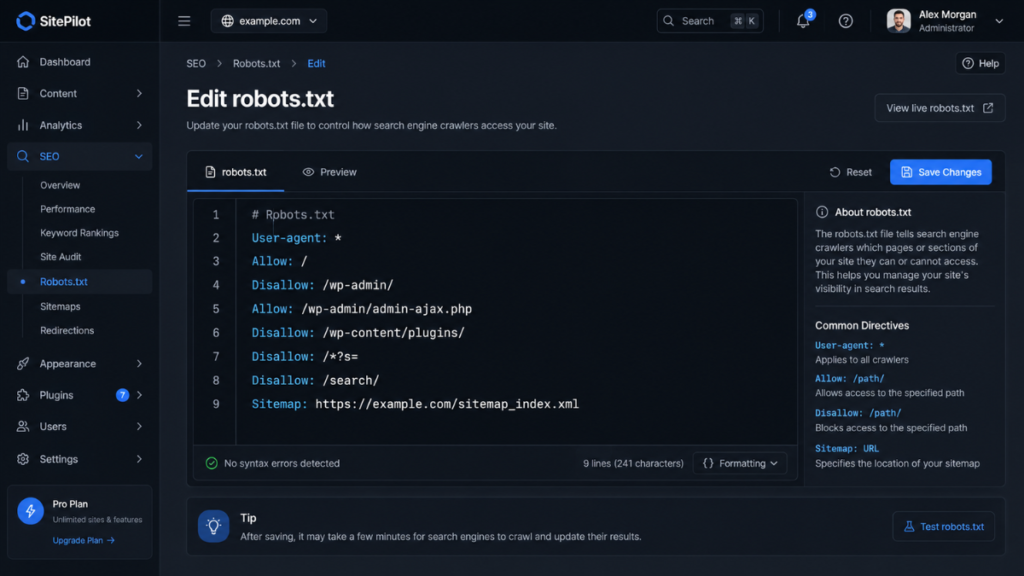
Method A: Using Rank Math or Yoast SEO
If you already use a popular SEO plugin to manage your layout, you can paste the text directly into their editor interface:
- Go to your dashboard sidebar and navigate to Rank Math > General Settings > Edit robots.txt (or Yoast > Tools > File Editor).
- Delete any default text sitting in the text box.
- Paste the clean text generated by ChatGPT.
- Click Save Changes.
Method B: The Pure Code Way (Without a Plugin)
If you want to keep your site completely lightweight and free of extra plugins, you can create a literal text file:
- Open a plain text editor on your computer (like TextEdit on your Mac) and paste the ChatGPT text block.
- Save the file exactly as
robots.txt(make sure it’s a plain text format, not rich text). - Log into your site’s root directory using a free FTP client or your hosting file manager, and upload the file directly into the main public folder (
public_html).
The Golden Technical Rules to Follow
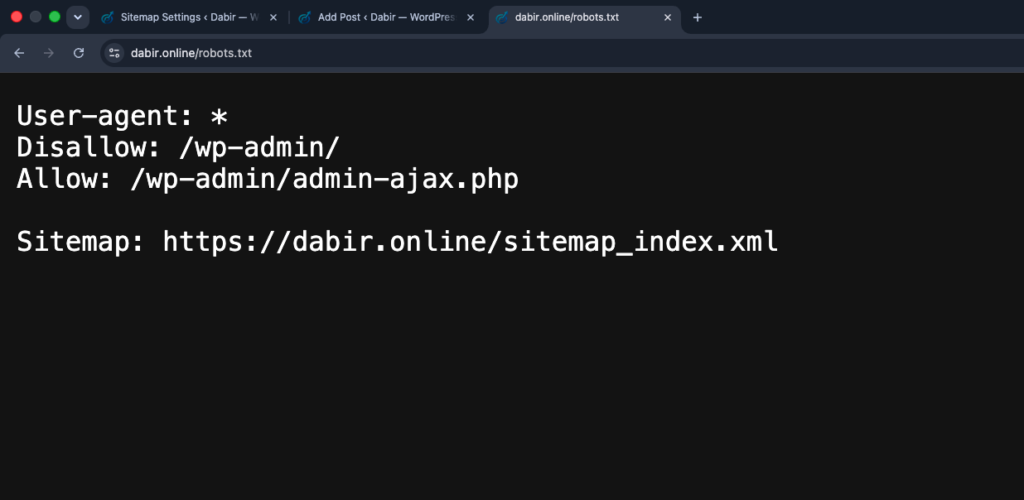
Once your file is live, make sure to use a fix indexing issues chatgpt prompt workflow or run it through Google Search Console’s live testing panel to verify these two things:
- Never Disallow wp-admin/admin-ajax.php: While you want to block the backend
/wp-admin/folder, modern WordPress themes rely onadmin-ajax.phpto display front-end elements like page layouts, forms, and dynamic loading grids. Always ensure your code explicitly leaves this file open if your scripts require it. - Case Sensitivity: Remember that Linux web servers read code literally.
Disallow: /wp-admin/is completely different fromDisallow: /WP-Admin/. Keep all paths strictly lower-case to avoid syntax bypasses.
Wrap Up
Setting up a clean index protocol is one of the most effective ways to boost your organic search speeds and ensure smooth search bot validation. By ditching unpredictable automated builders and using controlled AI prompts, you ensure your platform stays lean, fast, and completely compliant with indexing guidelines.
Drop a comment below if you want me to audit your current robots.txt layout syntax or if you need help finding your default XML sitemap string!

Vipul is a digital entrepreneur with a deep specialization in hardware optimization and web ecosystem management. With years of experience in the SEO industry and a passion for mechanical keyboard architecture, Vipul personally researches, tests, and writes every guide found on this site.